• Link to Facebook
  • Link to Youtube
  • Link to Instagram
  • Link to TikTok
Fast Delivery from Local Warehouses in the USA, Canada & Mexico – Delivered to Your Door! | Phone: (+1 ) 213-566-5854
Laser Welding Cutting Marking Cleaning Machines Manufacturer | Triumphlaser
  • HOME
  • LASER MACHINES
    • Laser Marking System
      • Fiber Laser Series
      • 3D Laser Series
      • CO2 Laser Series
      • UV Laser Series
    • Laser Welding System
    • Laser Cleaning System
    • Fiber Laser Cutting System
    • CO2 Laser Cutting System
    • Laser Engraving System
    • Optional Configuration
  • ACCESSORIES
  • SUPPORT
    • Laser Resources
    • FAQ
    • After sale service
    • Download
    • Troubleshooting
    • Submit Ticket
  • ABOUT
    • Feedback
    • Company News
  • CONTACT
  • SCHEDULE A CALL
  • SHOP NOW
  • Menu Menu
  • HOME
  • LASER MACHINES
    • Laser Marking System
      • Fiber Laser Series
      • 3D Laser Series
      • CO2 Laser Series
      • UV Laser Series
    • Laser Welding System
    • Laser Cleaning System
    • Fiber Laser Cutting System
    • CO2 Laser Cutting System
    • Laser Engraving System
    • Optional Configuration
  • ACCESSORIES
  • SUPPORT
    • Laser Resources
    • FAQ
    • After sale service
    • Download
    • Troubleshooting
    • Submit Ticket
  • ABOUT
    • Feedback
    • Company News
  • CONTACT
  • SCHEDULE A CALL
  • SHOP NOW

How to fix it – “Please check the pressure of the protective gas!”

When using a handheld laser welding machine with cleaning function, some users may encounter an air pressure alarm after switching from laser welding mode to laser cleaning mode.

“Please check the pressure of the protective gas! After confirming, click ‘OK’ to cancel the alarm.”
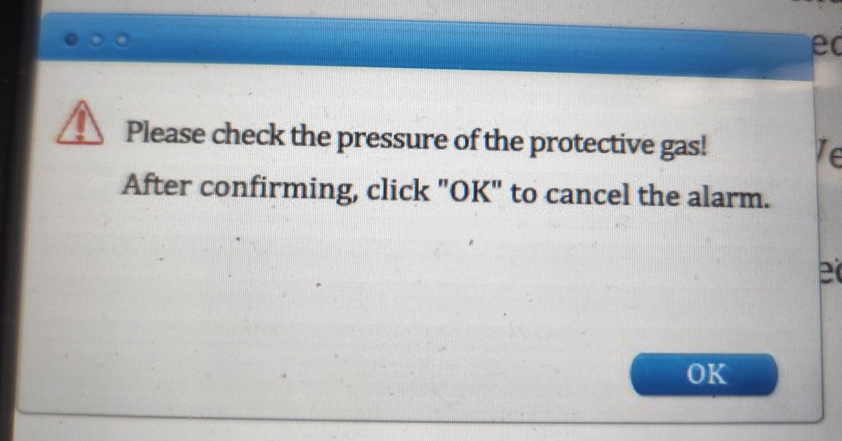
This issue is common and can usually be solved within one minute by adjusting the system settings.

This is not a hardware fault, but simply a parameter mismatch between working modes.

Problem Description

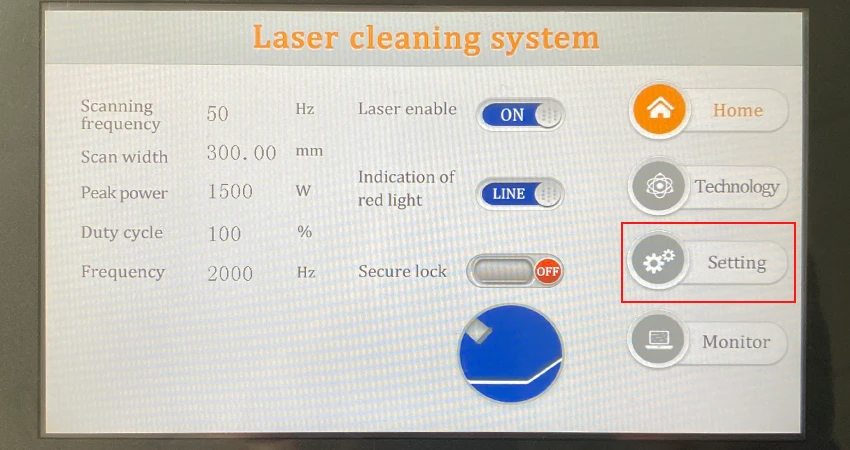
After the machine switches from welding mode to cleaning mode, a pressure alarm will be displayed on the machine’s control panel during operation.
This alarm may prevent the machine from starting or interrupt normal operation.

How to Fix the Air Pressure Alarm

Follow the steps below to adjust the pressure alarm setting:

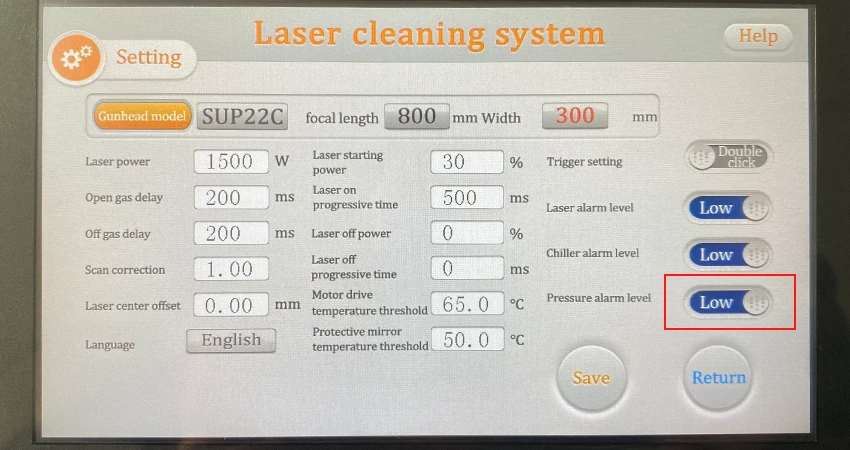
  1. Go to Setting
  2. Enter password: 123456
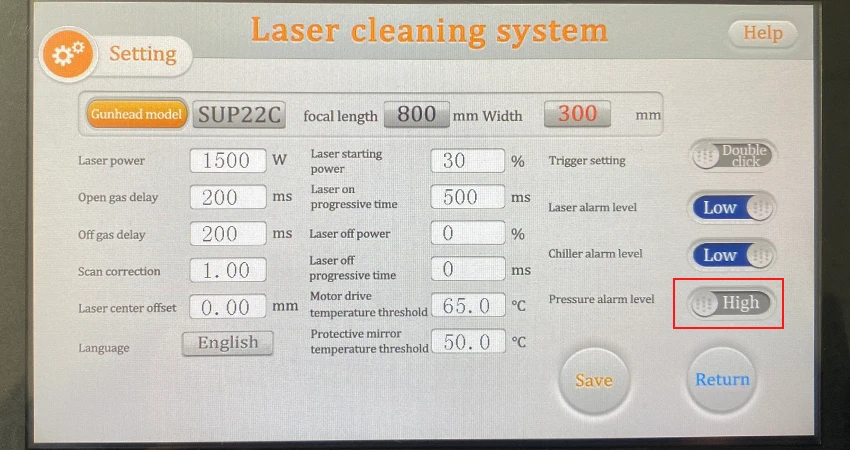
  3. Select Pressure Alarm Level (If the setting is High, change it to Low; if it is Low, change it to High)
  4. Click Save
  5. Click Return to exit.

After completing these steps, the air pressure alarm should be cleared and the machine can operate normally in cleaning mode.

If the problem persists after adjusting the settings, please contact our technical support team.

support@triumphlaser.com
Share this entry
  • Share on Facebook
  • Share on X
  • Share on Pinterest
  • Share on LinkedIn
  • Share on Tumblr
  • Share on Vk
  • Share on Reddit
  • Share by Mail
https://triumphlaser.com/wp-content/uploads/Please-check-the-pressure-of-the-protective-gas.png 441 842 triumphlaser https://triumphlaser.com/wp-content/uploads/logo.png triumphlaser2026-03-05 07:09:022026-03-09 03:01:54How to fix it – “Please check the pressure of the protective gas!”

Popular Searches

3D Laser Marking Machine Anodized Aluminum Laser Marking CO2 laser marking co2 laser marking machine Fiber Laser Cutter Fiber laser cutting machine fiber laser marking fiber laser marking machine fiber laser welding machine Glass laser engraving gun laser engraving machine handheld laser marking machine handheld laser welder handheld laser welding machine laser cleaning machine Laser cutter laser cutting for metal laser cutting machine laser engraver laser engraving machine Laser Engraving Plastic Laser Etching Stainless Steel laser marker laser marking machine laser marking machine for firearms laser marking machine for stainless steel laser marking on glasses Laser marking plastic laser marking system Laser marking tutorial Laser software tutorial laser welder laser welding machine Metal Laser Cutter metal laser cutting Metal Laser Engraving Metal marking machine MOPA color marking machine Paper laser cutting plastic laser marking machine Software uv laser marker UV laser marking machine uv laser marking machine for glass wood laser engraving machine

TRIUMPH LASERS

Laser Marking Systems

Laser Cutting Systems

Laser Engraving Systems

Laser Welding Systems

Optional Configuration

CONTACT US

Triumph Industrial Co.,Ltd
Triumph Group Co.,Limited
Colorado Hi-Tech Inc
Triumph Hi-tech Co.,Ltd
Email: sales@triumphlaser.com

TALK WITH AN EXPERT

Tel:(+86)-755-26996469

Tel:(+86)-755-29365152

US No.:(+1 ) 601-212-5395

US No.:(+1 ) 341-600-4010

US No.:(+1 ) 213-566-5854

QUICK LINK

Privacy Policy

Terms and Conditions

Refund/Return Policy

Contact Us

About Triumphlaser

Copyright © 2003-2026 | Triumph Laser All Rights Reserved
  • Link to Facebook
  • Link to Youtube
  • Link to Instagram
  • Link to TikTok
Link to: Talking about ultraviolet laser marking machine marking on plastic packaging Link to: Talking about ultraviolet laser marking machine marking on plastic packaging Talking about ultraviolet laser marking machine marking on plastic packagin...triumph uv laser marking machineTriumphlaser Link to: How to Use the Triumph Laser Welding Process Library Link to: How to Use the Triumph Laser Welding Process Library How to Use the Triumph Laser Welding Process LibraryTriumphlaserHow to Use the Triumph Laser Welding Process Library
Scroll to top Scroll to top Scroll to top
  • 24 Hours: (+1) 213-566-5854
  • sales@triumphlaser.com
  • INQUIRY NOW
  • SUBMIT TICKET